This flow was submitted before accounts existed, so nobody owns it yet. If you submitted it, open the edit link you were given — it still works — and you can attach the flow to an account from there. There is no deadline, and attaching it retires the link for good.
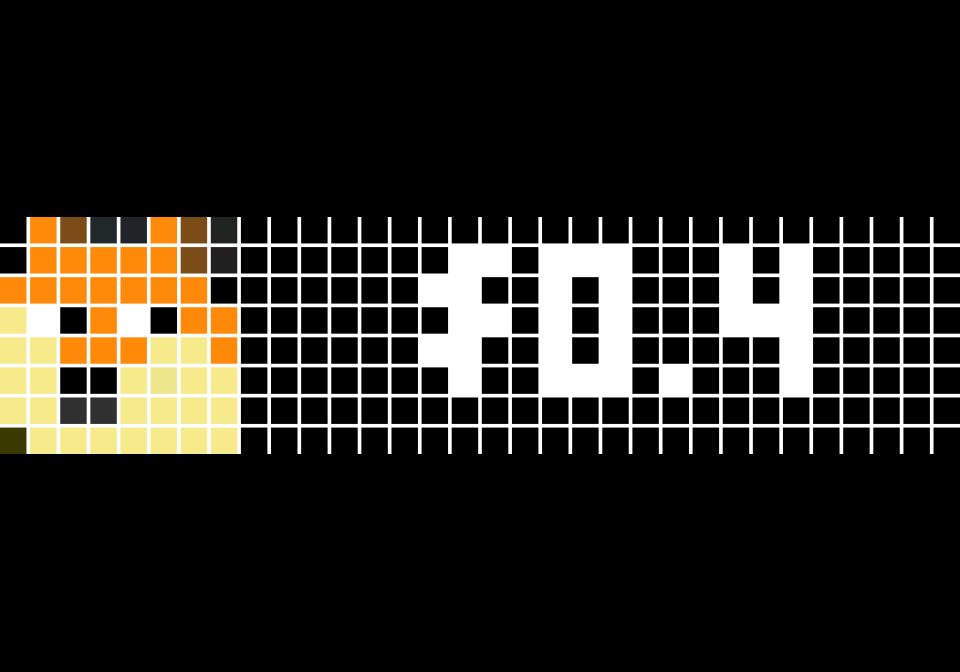
Dogecoin price
Display the price of Dogecoin with an update every 30 minutes.
| System | Home Assistant |
|---|---|
| Firmware | AWTRIX 3 |
| Topic | Smarthome |
| Built by | MrMasternode |
| File | rM3xABxBO8Lz.yaml · 2.7 KB |
| Icons | 1 |
| Published | 26 Nov 2024 · updated 26 Nov 2024 |
| Downloads | 41 |
This flow can be updated for any crypto asset on CoinGecko. Simply duplicate the flow & change to the currency you want - i.e. dogecoin
This flow currently is configured to display the price Dogecoin every 30 minutes using CoinGecko api
Steps:
Update Get parameters in Fetch Data (choose local currency i.e (eur/usd/cad) in lowercase format Update the ip in url at "Send to Clock" with your awtrix clock local ip
NOTE: To display the price of Dogecoin formatted to 2 digits i.e. $0.40 do the following:
Under "Send to Clock" update the Body Parameters Name: text Value: ${{ $json.dogecoin['usd'].round(2) }}
rM3xABxBO8Lz.yaml
{
  "name": "Dogecoin price",
  "nodes": [
    {
      "parameters": {
        "method": "POST",
        "url": "http://192.168.178.4/api/notify",
        "sendQuery": true,
        "queryParameters": {
          "parameters": [
            {
              "name": "name",
              "value": "dogecoin"
            }
          ]
        },
        "sendBody": true,
        "bodyParameters": {
          "parameters": [
            {
              "name": "text",
              "value": "={{ Object.values(Object.values($json)[0])[0] }}"
            },
            {
              "name": "icon",
              "value": "scepticdoge"
            }
          ]
        },
        "options": {}
      },
      "id": "83c9f202-8f79-4f68-9070-c80f6305ca89",
      "name": "Send to Clock",
      "type": "n8n-nodes-base.httpRequest",
      "typeVersion": 3,
      "position": [
        860,
        320
      ]
    },
    {
      "parameters": {
        "url": "https://api.coingecko.com/api/v3/simple/price",
        "sendQuery": true,
        "queryParameters": {
          "parameters": [
            {
              "name": "ids",
              "value": "=dogecoin"
            },
            {
              "name": "vs_currencies",
              "value": "usd"
            }
          ]
        },
        "options": {}
      },
      "id": "5dfa1f2c-0dcb-449a-8868-c8f424fb9124",
      "name": "Fetch Data",
      "type": "n8n-nodes-base.httpRequest",
      "typeVersion": 4.1,
      "position": [
        680,
        320
      ]
    },
    {
      "parameters": {
        "rule": {
          "interval": [
            {
              "field": "minutes",
              "minutesInterval": 30
            }
          ]
        }
      },
      "id": "945c8671-4705-4a24-8506-7ae2a2370cae",
      "name": "Every 30m",
      "type": "n8n-nodes-base.scheduleTrigger",
      "typeVersion": 1,
      "position": [
        460,
        320
      ]
    }
  ],
  "pinData": {},
  "connections": {
    "Fetch Data": {
      "main": [
        [
          {
            "node": "Send to Clock",
            "type": "main",
            "index": 0
          }
        ]
      ]
    },
    "Every 30m": {
      "main": [
        [
          {
            "node": "Fetch Data",
            "type": "main",
            "index": 0
          }
        ]
      ]
    }
  },
  "active": true,
  "settings": {
    "executionOrder": "v1"
  },
  "versionId": "cb55bc15-e4c1-4d25-9fea-ad15d1d9f557",
  "id": "B9QGbePDR5SJ2yio",
  "meta": {
    "instanceId": "4f8a54b5c3fc5a71355528acd3fa568f7d1ca2097f51009544d2c0361d479f51"
  },
  "tags": []
}
These icons belong on the device, in /ICONS. Each one is at
most 32×8
pixels — shown here magnified, at their real proportions.

8×8 px
More flows for Home Assistant or Smarthome
Something wrong with this flow? Report it.