This flow was submitted before accounts existed, so nobody owns it yet. If you submitted it, open the edit link you were given — it still works — and you can attach the flow to an account from there. There is no deadline, and attaching it retires the link for good.
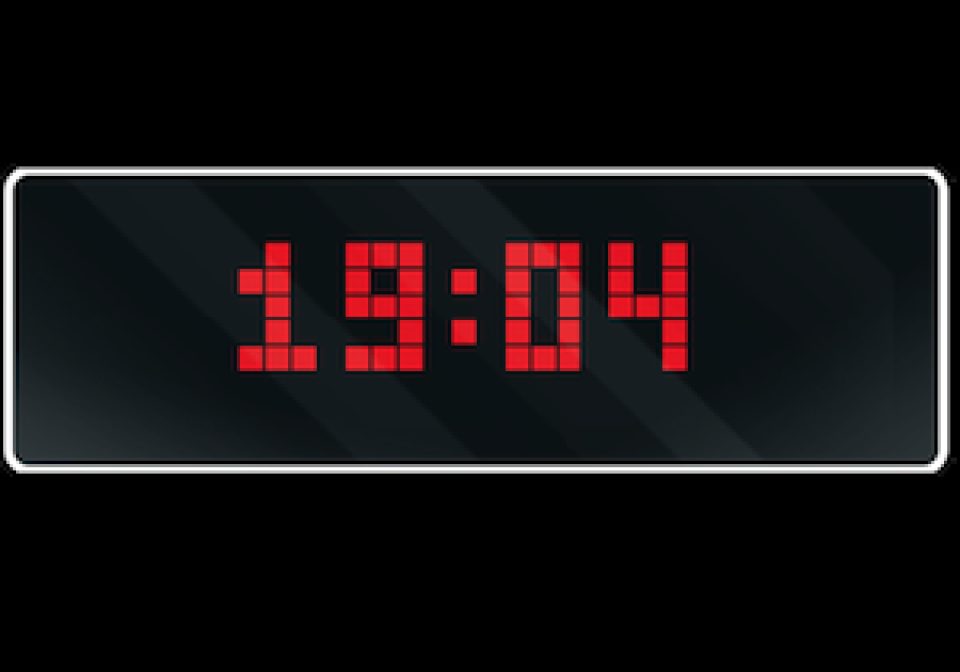
Night clock mode
This blueprint provides a night clock mode for AWTRIX Light. It allows you to personalize various aspects of the clockface to suit your preferences.
| System | Home Assistant Blueprint |
|---|---|
| Firmware | AWTRIX 3 |
| Topic | Smarthome |
| Built by | RobG |
| File | qMpQAg0Ro0Ky.yaml · 11.8 KB |
| Icons | — |
| Published | 8 Aug 2023 · updated 13 Mar 2024 |
| Downloads | 21 |

AWTRIX Night Clock
This blueprint provides a night clock mode for AWTRIX Light. It allows you to personalize various aspects of the clockface to suit your preferences.
Screenshot

Features
- This blueprint features a night clock mode, which displays a customized color, and you have the possibility to disable app transitions, automatic brightness, and the color of the night clock.
Prerequisites
AWTRIX v0.72 or higher
qMpQAg0Ro0Ky.yaml
blueprint:
name: "AWTRIX Night Clock"
description: >
## AWTRIX Night Clock
This blueprint provides a night clock mode for AWTRIX Light. It allows you to personalize various aspects of the clockface to suit your preferences.
### Screenshot

### Features
- This blueprint features a night clock mode, which displays a customized color, and you have the possibility to disable app transitions, automatic brightness, and the color of the night clock.
### Prerequisites
AWTRIX v0.72 or higher
domain: automation
input:
awtrix:
name: AWTRIX 3
description: Select the Awtrix light
selector:
device:
filter:
- integration: mqtt
manufacturer: Blueforcer
model: AWTRIX 3
multiple: true
sleep_time:
name: Night mode time
description: At what time does the clock need to activate night mode?
selector:
time: {}
default: "23:00:00"
wake_up_time:
name: Day mode time
description: At what time does the clock need activate day mode?
selector:
time: {}
default: "08:00:00"
sleep_settings_atrans:
name: Enable automatic app transition in night mode.
description: >
This setting allows you to enable or disable automatic transition of apps in night mode.
selector:
boolean:
default: false
sleep_settings_bri:
name: Night mode brightness setting
description: >
What is the brightness for night mode?
selector:
number:
min: 0
max: 255
default: "1"
sleep_settings_abri:
name: Enable automatic brightness when the night mode is active.
description: >
This setting allows you to enable or disable automatic brightening in night mode.
selector:
boolean:
default: false
sleep_settings_color:
name: Color setting for the night mode clock
description: This setting allows you to change the color of the night mode clock.
selector:
color_rgb:
default: [255, 0, 0]
sleep_weekday_bar:
name: Enable the weekday bar for the night mode clock
description: >
This setting allows you to enable or disable the weekday bar for the night mode clock.
selector:
boolean:
default: false
sleep_time_format:
name: Select the time format for the night mode clock
description: >
Select the time format for the night mode clock
selector:
select:
options:
- label: "13:30:45"
value: "%H:%M:%S"
- label: "1:30:45"
value: "%l:%M:%S"
- label: "13:30"
value: "%H:%M"
- label: "13:30 with blinking colon"
value: "%H %M"
- label: "1:30"
value: "%l:%M"
- label: "1:30 with blinking colon"
value: "%l %M"
- label: "1:30 PM"
value: "%l:%M %p"
- label: "1:30 PM with blinking colon"
value: "%l %M %p"
default: "%H:%M"
wakeup_settings_atrans:
name: Enable automatic app transitions in day mode?
description: >
This setting allows you to enable or disable the automatic transition of apps in day mode.
selector:
boolean:
default: true
wakeup_settings_bri:
name: Day mode brightness setting (1-255)
description: >
This setting allows you to adjust the brightness for day mode, pick a value between 1 and 255.
selector:
number:
min: 1
max: 255
default: "127"
wakeup_settings_abri:
name: Enable automatic brightness in day mode
description: >
This setting allows you to enable or disable automatic brightening in day mode.
selector:
boolean:
default: false
wakeup_settings_color:
name: Color setting for the day mode clock
description: This setting allows you to change the color of the day mode clock.
selector:
color_rgb:
default: [255, 255, 255]
wakeup_settings_calendar_color:
name: Color setting for the day mode calendar
description: This setting allows you to change the color of the day mode calendar.
selector:
color_rgb:
default: [255, 0, 0]
wakeup_settings_calendar_text_color:
name: Color setting for the day mode calendar text
description: This settings allows you to change the color of the day mode text in the calendar.
selector:
color_rgb:
default: [0, 0, 0]
wakeup_weekday_bar:
name: Enable the weekday bar for the day mode clock
description: >
This setting allows you to enable or disable the weekday bar for the day mode clock.
selector:
boolean:
default: false
wakeup_active_weekday_maker_color:
name: Color setting for the active weekday marker color
description: This settings allows you to change the active weekday marker color.
selector:
color_rgb:
default: [255, 255, 255]
wakeup_inactive_weekday_maker_color:
name: Color setting for the inactive weekday marker color
description: This settings allows you to change the inactive weekday marker color.
selector:
color_rgb:
default: [55, 57, 59]
wakeup_calendar_style:
name: Select the time/calendar style for the day mode clock
description: >
Select the time/calendar style
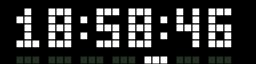 `Style 0`
---
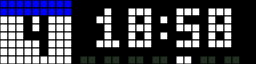 `Style 1`
---
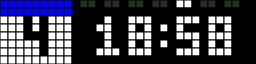 `Style 2`
---
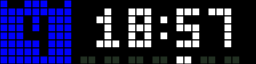 `Style 3`
---
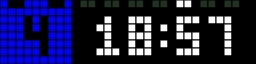 `Style 4`
selector:
select:
options:
- label: Style 0
value: "0"
- label: Style 1
value: "1"
- label: Style 2
value: "2"
- label: Style 3
value: "3"
- label: Style 4
value: "4"
default: "1"
wakeup_time_format:
name: Select the time format for the day mode clock
description: >
Select the time format for the day mode clock
selector:
select:
options:
- label: "13:30:45"
value: "%H:%M:%S"
- label: "1:30:45"
value: "%l:%M:%S"
- label: "13:30"
value: "%H:%M"
- label: "13:30 with blinking colon"
value: "%H %M"
- label: "1:30"
value: "%l:%M"
- label: "1:30 with blinking colon"
value: "%l %M"
- label: "1:30 PM"
value: "%l:%M %p"
- label: "1:30 PM with blinking colon"
value: "%l %M %p"
default: "%H:%M"
variables:
device_ids: !input awtrix
wake_up_time: !input wake_up_time
sleep_time: !input sleep_time
wakeup_weekday_bar: !input wakeup_weekday_bar
sleep_weekday_bar: !input sleep_weekday_bar
wakeup_settings_atrans: !input wakeup_settings_atrans
wakeup_settings_color: !input wakeup_settings_color
sleep_settings_atrans: !input sleep_settings_atrans
sleep_settings_color: !input sleep_settings_color
sleep_settings_abri: !input sleep_settings_abri
sleep_settings_bri: !input sleep_settings_bri
sleep_time_format: !input sleep_time_format
wakeup_settings_bri: !input wakeup_settings_bri
wakeup_settings_abri: !input wakeup_settings_abri
wakeup_calendar_style: !input wakeup_calendar_style
wakeup_settings_calendar_color: !input wakeup_settings_calendar_color
wakeup_settings_calendar_text_color: !input wakeup_settings_calendar_text_color
wakeup_inactive_weekday_maker_color: !input wakeup_inactive_weekday_maker_color
wakeup_active_weekday_maker_color: !input wakeup_active_weekday_maker_color
wakeup_time_format: !input wakeup_time_format
awtrix_devices: >-
{%- set ns = namespace(awtrix = []) -%}
{%- for device_id in device_ids -%}
{%- set device_name = iif(device_attr(device_id, 'name_by_user') != none, device_attr(device_id, 'name_by_user'), device_attr(device_id, 'name')) -%}
{%- set entity = expand(device_entities(device_id)) | select('search', 'device_topic') | map(attribute='entity_id') | first -%}
{%- set topic = states(entity) -%}
{% set ns.awtrix = ns.awtrix + [{"device": device_name, "entity": entity, "topic": topic}] -%}
{%- endfor -%}
{{ ns.awtrix }}
payload_sleep_switch: >-
{
"name": "Time"
}
payload_sleep_settings: >-
{ "ATRANS": {{ sleep_settings_atrans | lower }},
"BRI": {{ sleep_settings_bri }},
"ABRI": {{ sleep_settings_abri | lower }},
"TMODE": 0,
"TFORMAT": "{{ sleep_time_format }}",
"WD": {{ sleep_weekday_bar | lower }},
"TIME_COL": {{ sleep_settings_color }}
}
payload_wakeup_settings: >-
{ "ATRANS": {{ wakeup_settings_atrans | lower }},
"BRI": {{ wakeup_settings_bri }},
"ABRI": {{ wakeup_settings_abri | lower }},
"CHCOL": {{ wakeup_settings_calendar_color }},
"CTCOL": {{ wakeup_settings_calendar_text_color }},
"TMODE": {{ wakeup_calendar_style }},
"TFORMAT": "{{ wakeup_time_format }}",
"WD": {{ wakeup_weekday_bar | lower }},
"TIME_COL": {{ wakeup_settings_color }},
"WDCA": {{ wakeup_active_weekday_maker_color }},
"WDCI": {{ wakeup_inactive_weekday_maker_color }}
}
trigger:
- platform: time
at: !input wake_up_time
id: wakeup_timer
- platform: time
at: !input sleep_time
id: sleep_timer
condition: []
action:
- repeat:
for_each: "{{ awtrix_devices }}"
sequence:
- choose:
- conditions:
- condition: template
value_template: >
{{ states(repeat.item.entity) not in ['unavailable', 'unknown'] }}
sequence:
- if:
- condition: trigger
id:
- wakeup_timer
then:
- service: mqtt.publish
data:
qos: 0
retain: false
topic: "{{ repeat.item.topic ~ '/settings'}}"
payload: "{{ payload_wakeup_settings }}"
- if:
- condition: trigger
id:
- sleep_timer
then:
- service: mqtt.publish
data:
qos: 0
retain: false
topic: "{{ repeat.item.topic ~ '/settings'}}"
payload: "{{ payload_sleep_settings }}"
- service: mqtt.publish
data:
qos: 0
retain: false
topic: "{{ repeat.item.topic ~ '/switch'}}"
payload: "{{ payload_sleep_switch }}"More flows for Home Assistant Blueprint or Smarthome
Something wrong with this flow? Report it.