This flow was submitted before accounts existed, so nobody owns it yet. If you submitted it, open the edit link you were given — it still works — and you can attach the flow to an account from there. There is no deadline, and attaching it retires the link for good.
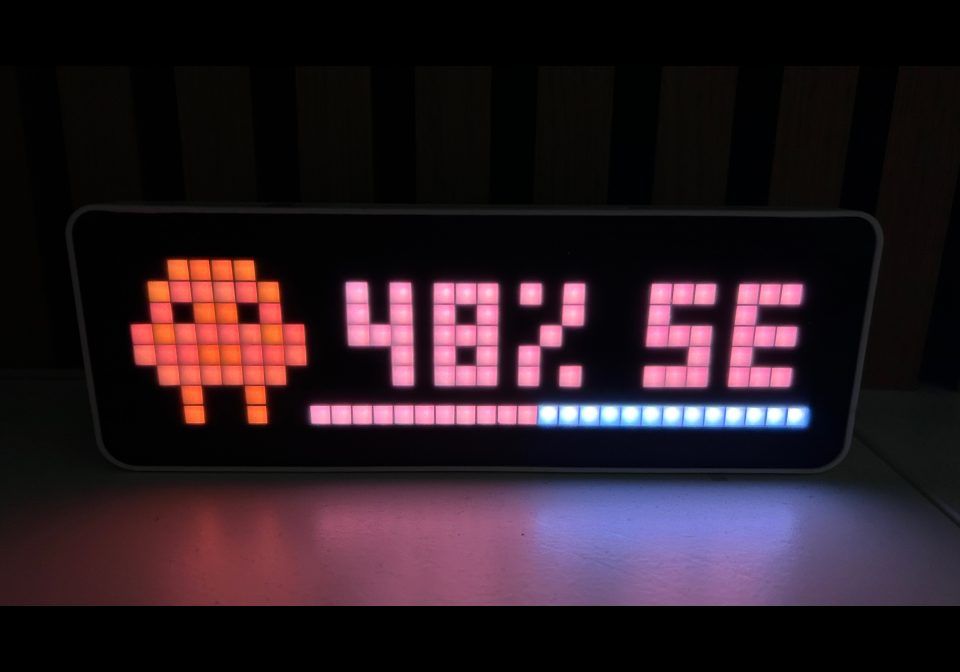
Awtrix – Claude Usage Display
Display your Claude AI usage as a live progress bar on an AWTRIX 3 LED matrix - color-coded and always up to date.
| System | Home Assistant Blueprint |
|---|---|
| Firmware | AWTRIX 3 |
| Topic | Smarthome |
| Built by | tnusch |
| File | dZKgA28EOyE2.yaml · 6.1 KB |
| Icons | — |
| Published | 26 May 2026 |
| Downloads | 34 |
What it does
Reads a Claude usage sensor (0–100%) from Home Assistant and pushes it to your Awtrix device via MQTT. The display shows the usage percentage alongside a progress bar, with text color that shifts from green → yellow → red as you approach your limits. Both thresholds are configurable.
The blueprint updates immediately whenever the sensor changes, and again on HA restart. If the sensor is unavailable, it gracefully falls back to an N/A state.
Tip: You can create this automation multiple times — for example once for weekly usage and once for session usage, each with its own app_name so both apps coexist in the Awtrix display rotation.
Prerequisites
- Home Assistant 2024.6 or newer
- Awtrix 3 with MQTT enabled
- MQTT broker (e.g. the Mosquitto add-on)
- A sensor exposing Claude usage as a percentage (0–100) — e.g. via hass-claude-usage
- A Claude icon installed on your Awtrix device — see the Awtrix icon docs (default icon ID:
74725)
dZKgA28EOyE2.yaml
blueprint:
  name: "Awtrix – Claude Usage"
  description: >
    Displays your Claude usage on an Awtrix LED matrix.
    Shows usage percentage with a progress bar, color-coded by thresholds.
    Triggers on Home Assistant start and on a configurable time pattern.
    It uses a custom icon you need to install.
  domain: automation
  author: "tnusch"
  homeassistant:
    min_version: "2024.6.0"
  input:
    usage_sensor:
      name: Claude Usage Sensor
      description: >
        Sensor that provides your Claude (weekly or session) usage as a percentage (0–100),
        e.g. via https://github.com/trickv/hass-claude-usage
      selector:
        entity:
          domain: sensor
    awtrix:
      name: AWTRIX Device
      description: Select the AWTRIX device
      selector:
        device:
          filter:
            - integration: mqtt
              manufacturer: Blueforcer
              model: AWTRIX 3

    app_name:
      name: AWTRIX Application name
      description: This is the app name listed in the MQTT topic - it should be unique
      selector:
        text:
      default: claude_usage

    icon_id:
      name: Awtrix Icon ID
      description: >
        Icon number pre-loaded on your Awtrix for Claude.
        Find out more about icons on https://blueforcer.github.io/awtrix3/#/icons.
      default: "74725"
      selector:
        text:

    suffix_text:
      name: Suffix to display
      description: Suffix to be displayed on AWTRIX to indicate usage type (e.g. "wk" for weekly, "se" for session)
      selector:
        text:
      default: "wk"

    base_color:
      name: Base Text & Progress Color
      description: >
        Hex color (without #) used for the text and progress bar (default as Claude brand color).
      default: "DE7356"
      selector:
        text:

    threshold_warn:
      name: Warning Threshold (%)
      description: >
        Usage above this percentage → yellow text color.
      default: 50
      selector:
        number:
          min: 1
          max: 99
          step: 1
          mode: slider

    threshold_high:
      name: High Threshold (%)
      description: >
        Usage above this percentage → red text color.
      default: 80
      selector:
        number:
          min: 1
          max: 99
          step: 1
          mode: slider

    scroll_speed:
      name: Scroll speed
      description: Modifies the scroll speed. Enter a percentage value of the original scroll speed.
      default: 100
      selector:
        number:
          min: 0
          max: 100
          step: 10
          unit_of_measurement: "%"
          mode: slider

    duration:
      name: Duration (in seconds)
      description: Sets how long the app should be displayed unit is seconds.
      default: 5
      selector:
        number:
          min: 0
          max: 10
          step: 1
          unit_of_measurement: "s"
          mode: slider

    text_case:
      name: Text Case
      description: Select how you would like your text to display.
      selector:
        select:
          options:
            - label: Use global setting
              value: "0"
            - label: Force Uppercase
              value: "1"
            - label: Show as you entered it
              value: "2"
          mode: dropdown
          custom_value: false
          multiple: false
          sort: false
      default: "0"

    push_icon:
      name: Icon Mode
      description: >
        Please select the pushIcon setting for the icon
          - `0`  Icon doesn't move

          - `1`  Icon moves with text and will not appear again

          - `2` Icon moves with text but appears again when the text starts to scroll again
      selector:
        select:
          options:
            - label: Icon doesn't move (default)
              value: "0"
            - label: Icon moves with text and will not appear again
              value: "1"
            - label: Icon moves with text but appears again when the text starts to scroll again
              value: "2"
      default: "0"

triggers:
  - trigger: homeassistant
    event: start
  - trigger: state
    entity_id: !input usage_sensor
    for:
      seconds: 5

variables:
  v_device_id: !input awtrix
  v_sensor:    !input usage_sensor
  v_suffix:    !input suffix_text
  v_awtrix:
    "{{ iif( device_attr(v_device_id, 'name_by_user') != none, device_attr(v_device_id,
    'name_by_user'), device_attr(v_device_id, 'name') ) }}"
  v_app:     !input app_name
  v_icon:      !input icon_id
  v_color:     !input base_color
  v_warn:      !input threshold_warn
  v_high:      !input threshold_high
  v_push_icon: !input push_icon
  v_duration: !input duration
  v_text_case: !input text_case
  v_scroll_speed: !input scroll_speed

conditions: []

actions:
  - action: mqtt.publish
    alias: "Publish Claude usage to Awtrix"
    data:
      qos: 0
      retain: false
      topic: "{{ v_awtrix }}/custom/{{v_app}}"
      payload: >-
        {% set usage = states(v_sensor) | int(-1) %}
        {% set ok = usage >= 0 %}

        {% set text_color = 'FF0000' if usage > v_high
                       else ('FFDE21' if usage > v_warn
                       else v_color) %}

        {% set text = usage ~ '% ' ~ v_suffix if ok else 'N/A' %}

        {{ {
          "text": text,
          "pushIcon": v_push_icon | int,
          "duration": v_duration | int,
          "textCase": v_text_case | int,
          "scrollSpeed": v_scroll_speed | int,
          "icon": v_icon,
          "color": text_color,
          "progress": usage,
          "progressC": v_color
        } | tojson if ok else
          {
            "text": "N/A",
            "icon": v_icon,
            "color": v_color,
            "progress": 0,
            "progressC": v_color,
            "duration": v_duration | int,
            "scrollSpeed": v_scroll_speed | int
          } | tojson }}

mode: restart
More flows for Home Assistant Blueprint or Smarthome
Something wrong with this flow? Report it.