This flow was submitted before accounts existed, so nobody owns it yet. If you submitted it, open the edit link you were given — it still works — and you can attach the flow to an account from there. There is no deadline, and attaching it retires the link for good.
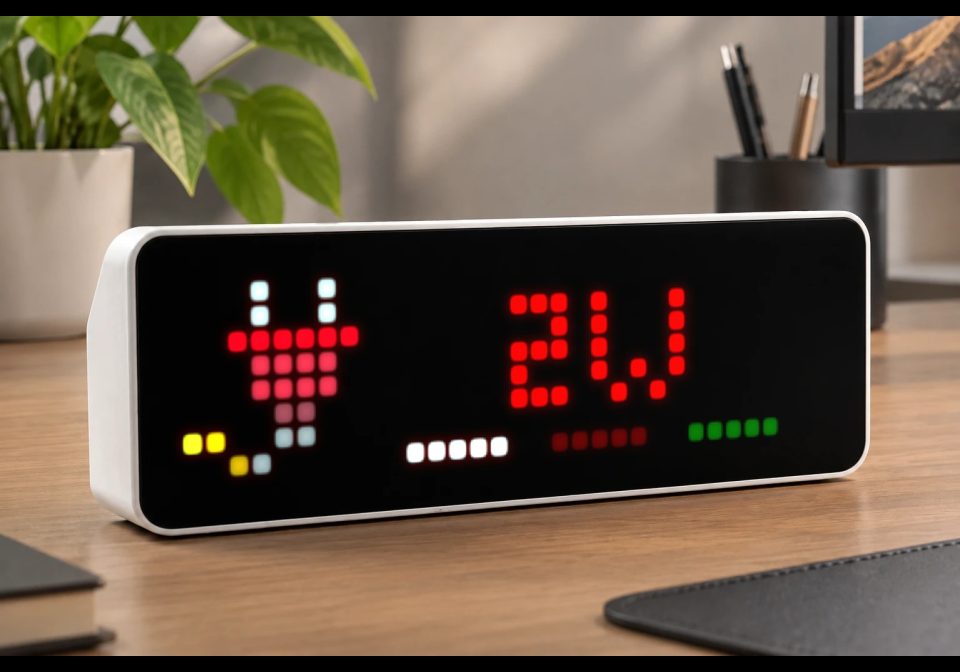
EcoTrackerMon
Electricity Usage + Meter Readings from an Everhome EcoTracker IR
| System | AWTRIX NG Scripts |
|---|---|
| Firmware | AWTRIX NG |
| Topic | Smarthome |
| Built by | Töm |
| File | Z33xjcCDXXlQ.ax · 5.5 KB |
| Icons | — |
| Published | 7 Aug 2026 · updated 11 Aug 2026 |
| Downloads | 13 |
EcoTracker Monitor
Overview
This AWTRIX NG script displays power consumption and meter readings from an Everhome EcoTracker IR.
The current power consumption or feed-in is shown in watts together with a LaMetric icon. The bottom row displays the load of each phase using a color gradient. If the EcoTracker IR is unreachable, the display indicates this accordingly.
To prevent text scrolling, the unit W is omitted for values with five or more digits.
Press the center button repeatedly to cycle through additional information, including the current meter readings in kWh (1.8.0, 1.8.1, 1.8.2, and 2.8.0, if available) as well as the connected Wi-Fi SSID and signal strength (dBm).
Installation
Before installing the script, make sure that:
- AWTRIX NG scripting is enabled.
- AWTRIX NG can reach the EcoTracker IR over Wi-Fi.
- AWTRIX NG firmware
1.0.10-devor later is installed (required for the settings). - The script has been tested with AWTRIX NG firmware
1.0.15-dev. - The required LaMetric icons (see below) have been uploaded to AWTRIX NG.
Installation steps:
- Upload the required LaMetric icons.
- Install the script on your AWTRIX NG.
- Configure the script settings (at minimum, set the EcoTracker IR network address).
Required Icons
Upload the following LaMetric icons via the AWTRIX NG web interface before installing the script:
40562– EcoTracker IR unreachable52648– Feed-in52715– Power consumption55398– Zero consumption
Configuration
The following settings are available under Apps in AWTRIX NG:
-
EcoTracker network address / IP address
Hostname or IP address of the EcoTracker IR (for exampleecotracker.localor192.168.178.99). -
Data refresh interval
Polling interval for the EcoTracker IR in seconds. -
Display duration
Data display in seconds -
refresh interval
Polling interval for the EcoTracker IR in seconds. -
Meter readings / Wi-Fi info duration (center button)
How long the meter readings and Wi-Fi information are displayed. -
Maximum power consumption per phase
Maximum value (W) used to calculate the color gradient for the phase load display. -
Maximum feed-in power per phase
Maximum value (W) used to calculate the color gradient for the phase load display. -
Show Wi-Fi signal strength indicator
Displays a colored indicator in the upper-left corner:- Yellow: signal weaker than -69 dBm
- Red: signal weaker than -79 dBm
-
Power consumption color
Text color for power consumption. Also used as the base color representing the maximum phase load. -
Feed-in color
Text color for feed-in power. Also used as the base color representing the maximum phase load. -
Zero consumption color
Text color for zero consumption. Also used for the zero-load state of each phase.
Privacy
The script communicates directly with the EcoTracker IR over your local network.
No external connections are made.
Troubleshooting
Icons are not displayed
Verify that all required LaMetric icons have been uploaded to your AWTRIX NG.
The display shows OFF
Verify that the configured network address or IP address of the EcoTracker IR is correct.
Changelog
v0.1 - Initial Version
v0.2 - add Duration in Seconds in Settings
v0.3 - Large font for meter readings and Wi-Fi information, minor positioning adjustments
v0.4 - memory optimizatons
Z33xjcCDXXlQ.ax
# @name EcoTrackerMonitor
# @desc Stromverbrauch+Zählerstände eines EcoTracker IR von Everhome
# @author Töm (taschenserver im Discord)
# @version 0.4
# @config ecotracker_ip text "EcoTracker Netzwerkadresse/IP-Adresse" default=ecotracker.local maxlen=253
# @config refreshrate number "Datenaktualisierungrate" default=5 min=2 max=600 unit=Sek.
# @config duration number "Anzeigedauer" default=5 min=1 max=600 unit=Sek.
# @config hold_powercounter number "Zählerstand-/WLAN-Infos Dauer (mittlere Taste)" default=10 min=2 max=600 unit=Sek.
# @config max_cons number "Max. Stromverbrauch pro Phase" default=3600 min=0 max=3600 unit=Watt
# @config max_feed_in number "Max. Einspeisung pro Phase" default=3600 min=0 max=3600 unit=Watt
# @config WiFi_signal_strength bool "Indikator WLAN-Signalstärke anzeigen" default=true
# @config power_consumption color "Stromverbrauch" default=0xFF0000
# @config power_feed_in color "Einspeisung" default=0x00FF00
# @config zero_power_consumption color "0-Verbrauch" default=0x666666

class EcoTrackerMon
  var url, ssid, phases, eCO, eCI, eCI1, eCI2
  var power, rssi, ticks, eStatticks, max_cons, max_feed_in, busel

  def _color_from_value(value)
    var m = value < 0 ? store.get("max_feed_in",3600) : store.get("max_cons",3600)
    var c = value < 0 ? store.get("power_feed_in",0x00FF00) : store.get("power_consumption",0xFF0000)
    value = value < 0 ? -value : value
    if value > m value = m end
    if value == 0
      value = int(store.get("zero_power_consumption",0x666666))
    else
      var f = 0.30 + 0.70 * (real(value) / m)
      var r = int(((c >> 16) & 0xFF) * f)
      var g = int(((c >> 8)  & 0xFF) * f)
      var b = int(( c        & 0xFF) * f)
      value = (r << 16) | (g << 8) | b
    end
    return value
  end

  def init()
    self.power  = nil
    self.rssi   = nil
    self.ssid   = nil
    self.phases = [0,0,0]
    self.ticks = 0
    self.busel = 0
    self.eStatticks = 0
  end

  def on_body(body, status)
    if body == nil return end
    var d = json.load(body)
    if !isinstance(d, map) return end
    self.power = d.find("power")
    self.rssi  = d.find("rssi")
    self.ssid  = d.find("ssid")

    self.phases[0] = d.find("powerPhase1")
    self.phases[1] = d.find("powerPhase2")
    self.phases[2] = d.find("powerPhase3")

    self.eCO = d.find("energyCounterOut")
    self.eCO = self.eCO == nil ? nil : round(real(self.eCO)/1000,1)
    self.eCI = d.find("energyCounterIn")
    self.eCI = self.eCI == nil ? nil : round(real(self.eCI)/1000,1)
    self.eCI1 = d.find("energyCounterIn1")
    self.eCI1 = self.eCI1 == nil ? nil : round(real(self.eCI1)/1000,1)
    self.eCI2 = d.find("energyCounterIn2")
    self.eCI2 = self.eCI2 == nil ? nil : round(real(self.eCI2)/1000,1)
  end

  def duration()
    return store.get("duration",5)*1000
  end

  def loop()
    var url = "http://"+store.get("ecotracker_ip", "192.168.178.99")+"/v1/json"
    if self.ticks <= 0
      self.ticks = store.get("refreshrate",5)
      http.get(url, / b, st -> self.on_body(b, st))
    end
    self.ticks -= 1
    if self.eStatticks <= 0
      self.busel = 0
    else
      self.eStatticks -= 1
    end
  end

  def draw()
    var t, tcol
    clear()

# Powercounter
    if self.busel != 0
      t = []
      if self.busel == 1
        t.push(["1.8.0: ",0xAAAAAA])
        t.push([str(self.eCI)+" kWh",0xFFFFFF])
        if self.eCI1 != nil
          t.push([" 1.8.1: ",0xAAAAAA])
          t.push([str(self.eCI1)+" kWh",0xFFFFFF])
        end
        if self.eCI2 != nil
          t.push([" 1.8.2: ",0xAAAAAA])
          t.push([str(self.eCI2)+" kWh",0xFFFFFF])
        end
        if self.eCO != nil
          t.push([" 2.8.0: ",0xAAAAAA])
          t.push([str(self.eCO)+" kWh",0xFFFFFF])
        end

# WIFI-Info
      elif self.busel == 2
        t.push(["WIFI: ",0xAAAAAA])
        if self.rssi != nil
          t.push([str(self.rssi)+ " dbm",0xFFFFFF])
        end
        if self.ssid != nil
          t.push(["  SSID: ",0xAAAAAA])
          t.push([self.ssid,0xFFFFFF])
        end
      end
      font("large")
      scroll_text(t,0xFFFFFF,{"mode":"loop","gap":8,"repeat":10})
      return
    end
# Power
    if self.power == nil
 	    t = "OFF"
  	  icon("40562", 0, 0)
 	    tcol = 0xFF0000
    else
      t = str(self.power)
      if self.power > -10000 && self.power < 10000 t = t+"W" end
      if self.power == 0
        icon("55398", 0, 0)
        tcol = store.get("zero_power_consumption",0x666666)
      elif self.power < 0
        icon("52648", 0, 0)
    	  tcol = store.get("power_feed_in",0x00FF00)
      else
        icon("52715", 0, 0)
        tcol = store.get("power_consumption",0xFF0000)
      end
    end

    var w = text_ink_width(t)
    text(9+((width()-9 - w) / 2), 6, t, tcol)
# Phases
    for x : 0 .. 2
      if self.phases[x] != nil
        tcol = self._color_from_value(self.phases[x])
        line((11+(x*7)),7,(15+(x*7)),7, tcol)
      end
    end
# WIFI
    if store.get("WiFi_signal_strength",true) == true
      if self.rssi == nil || self.rssi < -79 # WLAN db
        pixel(0, 0, 0xFF0000)
      elif self.rssi < -69
        pixel(0, 0, 0xFFFF00)
      end
    end
  end

  def on_button(btn)
    if btn == "select"
      self.ticks = 0
      self.busel += 1
      if self.busel > 2 self.busel = 0 end
      self.eStatticks = store.get("hold_powercounter",10)
    end
  end
end

return EcoTrackerMon()
Install it on your AWTRIX NG
Your browser writes the script straight to the device on your network. It joins the app rotation right away.
Some browsers refuse to talk to a device on your network from a public page. Download the flow and paste it into the Scripts tab of your device, or install it from a terminal:
More flows for AWTRIX NG Scripts or Smarthome
Something wrong with this flow? Report it.