This flow was submitted before accounts existed, so nobody owns it yet. If you submitted it, open the edit link you were given — it still works — and you can attach the flow to an account from there. There is no deadline, and attaching it retires the link for good.
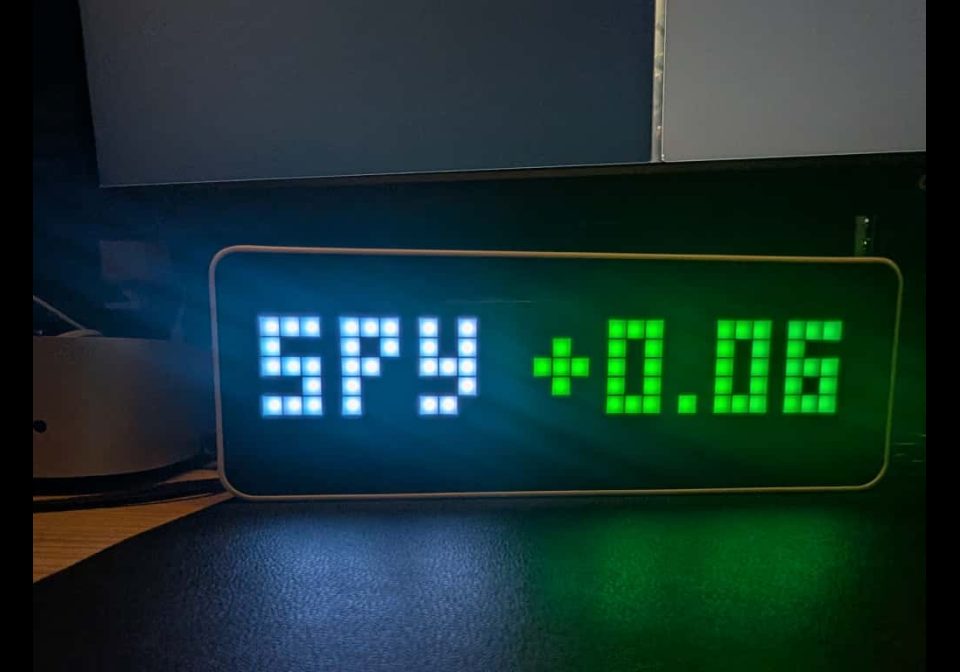
AWTRIX Stock Ticker
AWTRIX 3 Stock Ticker that displays real-time stock prices and color-coded percentage changes (Green/Red) during market hours using Finnhub.
| System | N8N |
|---|---|
| Firmware | AWTRIX 3 |
| Topic | Miscellaneous |
| Built by | Abhishek Prasad |
| File | Xj8YOkZ0oPpx.json · 3.1 KB |
| Icons | — |
| Published | 20 Nov 2025 · updated 20 Nov 2025 |
| Downloads | 20 |
Long Description
This workflow pushes real-time stock market data to your AWTRIX 3 (Ulanzi TC001) device. It is configured to track a specific stock (default: SPY) and display the current price along with the percentage change. The percentage is color-coded: Green for positive and Red for negative.
Features:
- Market Hours Schedule: Runs every 30 minutes only during US Stock Market hours (Mon-Fri, 6:00 AM - 1:30 PM PST) to save resources.
- Visual Feedback: Displays the stock symbol and a color-coded percentage change (e.g.,
SPY +0.45%in Green). - Finnhub Integration: Uses the reliable Finnhub API for accurate data.
Setup Requirements:
- Finnhub API Key: Get a free API key from Finnhub.io.
- AWTRIX IP Address: You need the local IP address of your AWTRIX 3 device.
Configuration:
- Open the Get Stock Data node and replace
YOUR_FINNHUB_API_KEYwith your actual key. You can also changeSPYto any other ticker symbol (e.g.,AAPL,BTC-USD). - Open the Send to AWTRIX node and replace
YOUR_AWTRIX_IPwith your device's IP address (e.g.,192.168.1.50). - (Optional) Adjust the Schedule node if you are in a different time zone (default is PST).
Xj8YOkZ0oPpx.json
{
    "name": "AWTRIX Stock Ticker (Shareable)",
    "nodes": [
        {
            "parameters": {
                "triggerTimes": {
                    "item": [
                        {
                            "mode": "custom",
                            "cronExpression": "*/30 6-13 * * 1-5"
                        }
                    ]
                }
            },
            "name": "Schedule",
            "type": "n8n-nodes-base.cron",
            "typeVersion": 1,
            "position": [
                250,
                300
            ]
        },
        {
            "parameters": {
                "url": "https://finnhub.io/api/v1/quote?symbol=SPY&token=YOUR_FINNHUB_API_KEY",
                "options": {}
            },
            "name": "Get Stock Data",
            "type": "n8n-nodes-base.httpRequest",
            "typeVersion": 3,
            "position": [
                450,
                300
            ]
        },
        {
            "parameters": {
                "jsCode": "const percentChange = items[0].json.dp;\nconst symbol = \"SPY\";\nconst isUp = percentChange >= 0;\nconst color = isUp ? '00FF00' : 'FF0000';\nconst sign = isUp ? '+' : '';\n\nreturn [\n  {\n    json: {\n      text: [\n        { t: symbol + \" \", c: \"FFFFFF\" },\n        { t: sign + percentChange.toFixed(2) + \"%\", c: color }\n      ],\n      icon: \"525\", \n      pushIcon: 2,\n      repeat: 2,\n      duration: 10\n    }\n  }\n];"
            },
            "name": "Format for AWTRIX",
            "type": "n8n-nodes-base.code",
            "typeVersion": 1,
            "position": [
                650,
                300
            ]
        },
        {
            "parameters": {
                "method": "POST",
                "url": "http://YOUR_AWTRIX_IP/api/custom?name=stock",
                "sendBody": true,
                "specifyBody": "json",
                "jsonBody": "={{JSON.stringify($json)}}",
                "options": {}
            },
            "name": "Send to AWTRIX",
            "type": "n8n-nodes-base.httpRequest",
            "typeVersion": 3,
            "position": [
                850,
                300
            ]
        }
    ],
    "connections": {
        "Schedule": {
            "main": [
                [
                    {
                        "node": "Get Stock Data",
                        "type": "main",
                        "index": 0
                    }
                ]
            ]
        },
        "Get Stock Data": {
            "main": [
                [
                    {
                        "node": "Format for AWTRIX",
                        "type": "main",
                        "index": 0
                    }
                ]
            ]
        },
        "Format for AWTRIX": {
            "main": [
                [
                    {
                        "node": "Send to AWTRIX",
                        "type": "main",
                        "index": 0
                    }
                ]
            ]
        }
    }
}
More flows for N8N or Miscellaneous
Something wrong with this flow? Report it.