This flow was submitted before accounts existed, so nobody owns it yet. If you submitted it, open the edit link you were given — it still works — and you can attach the flow to an account from there. There is no deadline, and attaching it retires the link for good.
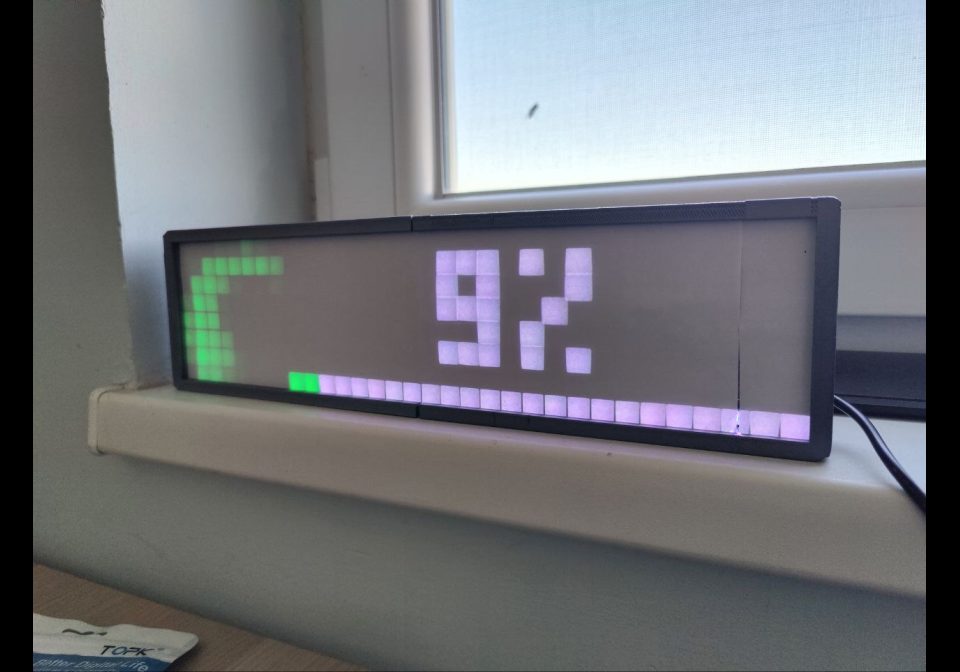
Octoprint Progress
Show progress of the current active print in Octoprint
| System | Home Assistant |
|---|---|
| Firmware | AWTRIX 3 |
| Topic | Miscellaneous |
| Built by | Dimitar Ilkov |
| File | WBq65KWX5ywp.yaml · 1.0 KB |
| Icons | 1 |
| Published | 25 Nov 2024 · updated 30 Nov 2024 |
| Downloads | 41 |
Shows and updates the progress of the print based on the current progress and status.
Before using, change the topic prefix according to your device
WBq65KWX5ywp.yaml
alias: Awtrix Ocotprint
description: ""
triggers:
  - trigger: state
    entity_id:
      - sensor.octoprint_job_percentage
      - sensor.octoprint_current_state
actions:
  - action: mqtt.publish
    metadata: {}
    data:
      qos: 0
      retain: false
      topic: awtrix_978bd4/custom/octoprint
      payload: |-
        {
         "text": "{% if is_state('sensor.octoprint_current_state', 'Printing') %}{{ states('sensor.octoprint_job_percentage') | round }}% ETA: {{ as_timestamp(states('sensor.octoprint_estimated_finish_time')) |  timestamp_custom('%-I:%M %p') }}{% else %}Idle{% endif %}",
         "icon": "37809",
         {% if is_state('sensor.octoprint_current_state', 'Printing') %}
          "progress": {{ states('sensor.octoprint_job_percentage') | round }},
          "progressC": "#00ff00",
        {% else %}
         "lifetime": 600,
        {% endif %}
         "repeat": 2,
         "duration": 5
        }
mode: single
These icons belong on the device, in /ICONS. Each one is at
most 32×8
pixels — shown here magnified, at their real proportions.

8×8 px
More flows for Home Assistant or Miscellaneous
Something wrong with this flow? Report it.