This flow was submitted before accounts existed, so nobody owns it yet. If you submitted it, open the edit link you were given — it still works — and you can attach the flow to an account from there. There is no deadline, and attaching it retires the link for good.
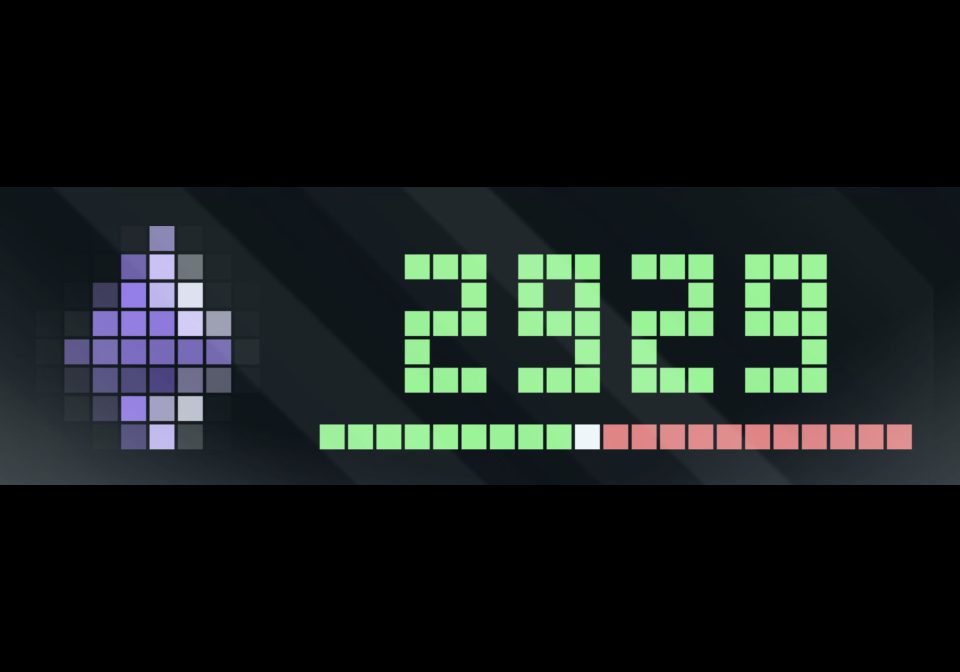
Crypto Ticker
Node-RED flow that streams live cryptocurrency prices from Kraken WebSocket v2 and displays them on an AWTRIX 3 LED display. The project supports multiple assets (e.g. Bitcoin, Ethereum) through a single WebSocket connection, renders price trend indicato
| System | Node-RED |
|---|---|
| Firmware | AWTRIX 3 |
| Topic | Miscellaneous |
| Built by | carlos |
| File | RpwLoMMYolZ4.json · 10.1 KB |
| Icons | 2 |
| Published | 27 Dec 2025 · updated 27 Dec 2025 |
| Downloads | 58 |
This project is a Node-RED–based crypto price visualizer built around Kraken WebSocket API v2 and AWTRIX 3 LED displays. Currently Bitcoin and Ethereum are configured. You can add other tokens easily.
It establishes one persistent WebSocket connection to Kraken and subscribes to multiple ticker symbols simultaneously (e.g. BTC/USD, ETH/USD). Incoming market data is parsed and routed through a central Crypto Router function, which:
- Correctly extracts symbol and price data from Kraken WS v2 payloads
- Formats prices as full numeric values (no K/M notation)
- Applies color logic based on price vs VWAP
- Each asset is displayed as a separate AWTRIX app, rotating independently on the LED matrix.
An optional visual progress bar can be rendered at the bottom of the display to show the current price position relative to the daily low/high range, including a precise white pixel marker for the exact price.
Crypto Router Configuration
At the top of the Crypto Router function, two configuration options control global behavior:
let progressbar = true; // enable high / low "progressbar"
let awtrix_url = "http://awtrix.lan/"; // including ending slash
Configuration Options
-
progressbar
Enables or disables rendering of the low/high progress bar on the AWTRIX display.
When enabled, a red baseline, green progress indicator, and white price marker are drawn. -
awtrix_url
Base URL of the AWTRIX 3 device.
The router dynamically appends the app name using the supported query-parameter API:
/api/custom?name=
➕ Adding a New Cryptocurrency (Quick Steps)
-
Add symbol to Kraken subscription
- Edit Inject node → add
"SYMBOL/USD"tosymbol[]
- Edit Inject node → add
-
Register asset in Crypto Router
-
Add entry to
assetsmap:"SOL/USD": { name: "solana", icon: "solana" }
-
-
(Optional) Upload icon
- Add GIF to AWTRIX and reference its name
-
Deploy
- New currency appears as a separate AWTRIX app automatically
RpwLoMMYolZ4.json
[
    {
        "id": "928e76fe90e4b0b2",
        "type": "group",
        "z": "f6f2187d.f17ca8",
        "style": {
            "stroke": "#2b2b2b",
            "stroke-opacity": "1",
            "fill": "#181818",
            "fill-opacity": "0.5",
            "label": true,
            "label-position": "nw",
            "color": "#cccccc"
        },
        "nodes": [
            "30d18f9c2bdedc24",
            "52a47dabab5920f8",
            "899e05b3fdb39f52",
            "0f3adbee2be59c5b",
            "74243b903398cd5a",
            "675ec78be173b19b",
            "093cb114e4edfdf7",
            "7a5a94f521f1a7d9",
            "d60c52eb6ea6ed25",
            "30122ee8832c8781",
            "42c04bb929b32c97",
            "40f35cd0536d92cf",
            "6e56eb0c1c94936c"
        ],
        "x": 14,
        "y": 199,
        "w": 1012,
        "h": 342
    },
    {
        "id": "30d18f9c2bdedc24",
        "type": "websocket out",
        "z": "f6f2187d.f17ca8",
        "g": "928e76fe90e4b0b2",
        "name": "",
        "server": "",
        "client": "5767230c7420f162",
        "x": 300,
        "y": 280,
        "wires": []
    },
    {
        "id": "52a47dabab5920f8",
        "type": "websocket in",
        "z": "f6f2187d.f17ca8",
        "g": "928e76fe90e4b0b2",
        "name": "",
        "server": "",
        "client": "5767230c7420f162",
        "x": 160,
        "y": 240,
        "wires": [
            [
                "0f3adbee2be59c5b"
            ]
        ]
    },
    {
        "id": "899e05b3fdb39f52",
        "type": "inject",
        "z": "f6f2187d.f17ca8",
        "g": "928e76fe90e4b0b2",
        "name": "",
        "props": [
            {
                "p": "payload"
            }
        ],
        "repeat": "3600",
        "crontab": "",
        "once": true,
        "onceDelay": "2",
        "topic": "",
        "payload": "{\"method\":\"subscribe\",\"params\":{\"channel\":\"ticker\",\"symbol\":[\"BTC/USD\",\"ETH/USD\"]}}",
        "payloadType": "json",
        "x": 110,
        "y": 280,
        "wires": [
            [
                "30d18f9c2bdedc24"
            ]
        ]
    },
    {
        "id": "0f3adbee2be59c5b",
        "type": "json",
        "z": "f6f2187d.f17ca8",
        "g": "928e76fe90e4b0b2",
        "name": "",
        "property": "payload",
        "action": "obj",
        "pretty": false,
        "x": 350,
        "y": 240,
        "wires": [
            [
                "74243b903398cd5a"
            ]
        ]
    },
    {
        "id": "74243b903398cd5a",
        "type": "switch",
        "z": "f6f2187d.f17ca8",
        "g": "928e76fe90e4b0b2",
        "name": "",
        "property": "payload.channel",
        "propertyType": "msg",
        "rules": [
            {
                "t": "eq",
                "v": "ticker",
                "vt": "str"
            },
            {
                "t": "else"
            }
        ],
        "checkall": "true",
        "repair": false,
        "outputs": 2,
        "x": 490,
        "y": 240,
        "wires": [
            [
                "675ec78be173b19b"
            ],
            []
        ]
    },
    {
        "id": "675ec78be173b19b",
        "type": "change",
        "z": "f6f2187d.f17ca8",
        "g": "928e76fe90e4b0b2",
        "name": "",
        "rules": [
            {
                "t": "set",
                "p": "high",
                "pt": "msg",
                "to": "payload.data[0].high",
                "tot": "msg"
            },
            {
                "t": "set",
                "p": "low",
                "pt": "msg",
                "to": "payload.data[0].low",
                "tot": "msg"
            },
            {
                "t": "set",
                "p": "avg",
                "pt": "msg",
                "to": "payload.data[0].vwap",
                "tot": "msg"
            },
            {
                "t": "set",
                "p": "price",
                "pt": "msg",
                "to": "payload.data[0].last",
                "tot": "msg"
            }
        ],
        "action": "",
        "property": "",
        "from": "",
        "to": "",
        "reg": false,
        "x": 660,
        "y": 240,
        "wires": [
            [
                "093cb114e4edfdf7",
                "d60c52eb6ea6ed25"
            ]
        ]
    },
    {
        "id": "093cb114e4edfdf7",
        "type": "debug",
        "z": "f6f2187d.f17ca8",
        "g": "928e76fe90e4b0b2",
        "name": "current price",
        "active": true,
        "tosidebar": false,
        "console": false,
        "tostatus": true,
        "complete": "payload",
        "targetType": "msg",
        "statusVal": "payload",
        "statusType": "auto",
        "x": 910,
        "y": 240,
        "wires": []
    },
    {
        "id": "7a5a94f521f1a7d9",
        "type": "function",
        "z": "f6f2187d.f17ca8",
        "g": "928e76fe90e4b0b2",
        "name": "Crypto Router",
        "func": "let progressbar = true; // enable high / low \"progressbar\"\nlet awtrix_url = \"http://awtrix.lan/\"; // including ending slash\n\n// 1. Ignore heartbeats & malformed messages\nif (\n    !msg.payload ||\n    msg.payload.channel !== \"ticker\" ||\n    !Array.isArray(msg.payload.data) ||\n    !msg.payload.data[0]\n) {\n    return null;\n}\n\n// 2. Extract Kraken v2 data correctly\nconst d = msg.payload.data[0];\n\nconst symbol = d.symbol;\nconst price  = d.last;\nconst avg    = d.vwap;\nconst low    = d.low;\nconst high   = d.high;\n\n// 3. Asset routing table\nconst assets = {\n    \"BTC/USD\": {\n        name: \"bitcoin\",\n        icon: \"bitcoin\",\n        divisor: 1_000_000,\n        suffix: \"M\"\n    },\n    \"ETH/USD\": {\n        name: \"ethereum\",\n        icon: \"ethereum\",\n        divisor: 1_000,\n        suffix: \"K\"\n    }\n};\n\n// 4. Drop unknown symbols safely\nif (!assets[symbol]) {\n    node.warn(\"Unhandled symbol: \" + symbol);\n    return null;\n}\n\nconst asset = assets[symbol];\n\n// 5. Color logic\nlet color = price > avg ? \"#80ff82\" : \"#ff7373\";\n\n// 6. Display value\nlet value = Math.round(price).toString();\n\n// let value = (price / asset.divisor).toFixed(2) + asset.suffix;\n\n// 7. Build AWTRIX payload\nlet awtrix = {\n    text: value,\n    icon: asset.icon,\n    color: color,\n    lifetime: \"600\", // seconds\n    lifetimeMode: \"STALE\" // red frame if not updated in\n};\n\n// 8. Optional low/high bar\nif (high > low && progressbar) {\n    let pct = (price - low) / (high - low);\n    let barStart = 10;\n    let barWidth = 20;\n\n    // Clamp pct to [0,1] for safety\n    pct = Math.max(0, Math.min(1, pct));\n\n    let barPos = Math.round(barWidth * pct);\n\n    awtrix.draw = [\n        // Full range (red)\n        { dl: [barStart, 7, barStart + barWidth, 7, \"#ff7373\"] },\n\n        // Current position (green)\n        { dl: [barStart, 7, barStart + barPos, 7, \"#80ff82\"] },\n\n        // Exact price marker (white pixel)\n        { dp: [barStart + barPos + 1, 7, \"#ffffff\"] }\n    ];\n\n}\n\n// 9. Finalize message\nmsg.name = asset.name;\n\n// 🔴 FIX: set app-specific URL\nmsg.url = awtrix_url + \"api/custom?name=\" + asset.name;\n\nmsg.payload = JSON.stringify(awtrix);\n\nreturn msg;",
        "outputs": 1,
        "timeout": 0,
        "noerr": 0,
        "initialize": "",
        "finalize": "",
        "libs": [],
        "x": 300,
        "y": 400,
        "wires": [
            [
                "30122ee8832c8781",
                "42c04bb929b32c97",
                "6e56eb0c1c94936c"
            ]
        ]
    },
    {
        "id": "d60c52eb6ea6ed25",
        "type": "throttle",
        "z": "f6f2187d.f17ca8",
        "g": "928e76fe90e4b0b2",
        "name": "",
        "throttleType": "time",
        "timeLimit": "1",
        "timeLimitType": "seconds",
        "countLimit": 0,
        "blockSize": 0,
        "locked": false,
        "x": 130,
        "y": 400,
        "wires": [
            [
                "7a5a94f521f1a7d9"
            ]
        ]
    },
    {
        "id": "30122ee8832c8781",
        "type": "http request",
        "z": "f6f2187d.f17ca8",
        "g": "928e76fe90e4b0b2",
        "name": "",
        "method": "POST",
        "ret": "txt",
        "paytoqs": "ignore",
        "url": "",
        "tls": "",
        "persist": false,
        "proxy": "",
        "insecureHTTPParser": false,
        "authType": "",
        "senderr": false,
        "headers": [],
        "x": 470,
        "y": 400,
        "wires": [
            [
                "40f35cd0536d92cf"
            ]
        ]
    },
    {
        "id": "42c04bb929b32c97",
        "type": "debug",
        "z": "f6f2187d.f17ca8",
        "g": "928e76fe90e4b0b2",
        "name": "debug 1",
        "active": false,
        "tosidebar": true,
        "console": false,
        "tostatus": false,
        "complete": "url",
        "targetType": "msg",
        "statusVal": "",
        "statusType": "auto",
        "x": 480,
        "y": 460,
        "wires": []
    },
    {
        "id": "40f35cd0536d92cf",
        "type": "debug",
        "z": "f6f2187d.f17ca8",
        "g": "928e76fe90e4b0b2",
        "name": "debug 2",
        "active": false,
        "tosidebar": true,
        "console": false,
        "tostatus": false,
        "complete": "false",
        "statusVal": "",
        "statusType": "auto",
        "x": 720,
        "y": 420,
        "wires": []
    },
    {
        "id": "6e56eb0c1c94936c",
        "type": "debug",
        "z": "f6f2187d.f17ca8",
        "g": "928e76fe90e4b0b2",
        "name": "debug 3",
        "active": false,
        "tosidebar": true,
        "console": false,
        "tostatus": false,
        "complete": "payload",
        "targetType": "msg",
        "statusVal": "",
        "statusType": "auto",
        "x": 560,
        "y": 500,
        "wires": []
    },
    {
        "id": "5767230c7420f162",
        "type": "websocket-client",
        "path": "wss://ws.kraken.com/v2",
        "tls": "",
        "wholemsg": "false",
        "hb": "30",
        "subprotocol": "",
        "headers": []
    },
    {
        "id": "e9b4b66913de03e7",
        "type": "global-config",
        "env": [],
        "modules": {
            "node-red-contrib-throttle": "0.1.7"
        }
    }
]
These icons belong on the device, in /ICONS. Each one is at
most 32×8
pixels — shown here magnified, at their real proportions.

8×8 px

8×8 px
More flows for Node-RED or Miscellaneous
Something wrong with this flow? Report it.