This flow was submitted before accounts existed, so nobody owns it yet. If you submitted it, open the edit link you were given — it still works — and you can attach the flow to an account from there. There is no deadline, and attaching it retires the link for good.
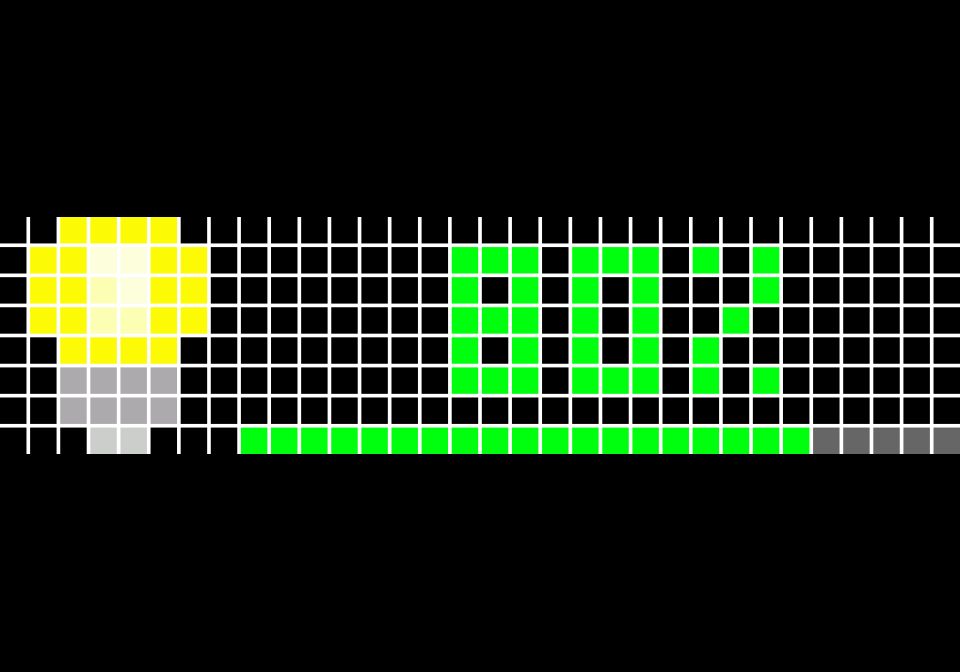
Awtrix Light Status Display
Displays the current state (on/off, brightness, and color) of selected lights on an Awtrix screen whenever they change. Add your light entities under trigger.entity_id. Supports RGB, dimmable, and on/off-only lights, and shows the light name, brightness %
| System | Home Assistant |
|---|---|
| Firmware | AWTRIX 3 |
| Topic | Miscellaneous |
| Built by | Giacomo Stellati |
| File | QYRwAZEz56jy.yaml · 2.1 KB |
| Icons | — |
| Published | 23 Apr 2025 |
| Downloads | 18 |
This automation is designed to send dynamic notifications to an Awtrix display based on the state of lights in your Home Assistant setup. It monitors a list of light entities (defined at the top of the automation under the trigger.entity_id section) and reacts whenever any of them changes state — whether it's turning on or off, changing brightness, or adjusting color.
You can include RGB lights, dimmable white lights, or basic on/off-only lights. When a light changes, the automation evaluates its current state and determines:
- The light's name (friendly_name) for display.
- Whether the light is off (and shows "Off" with a gray color).
- The brightness level as a percentage (if available).
- The color to use on the Awtrix screen, matching the light's actual RGB color, yellow for dimmable lights without color, or green for simple on/off lights.
It then publishes a formatted MQTT message to the Awtrix topic, which results in a visual display showing the light name, brightness percentage, a progress bar, and color matching the light's state.
To use this automation, make sure you add all the lights you want to track at the top in the trigger.entity_id list.
This setup ensures that any change in your lighting setup is immediately reflected on the Awtrix screen with both visual and textual feedback — clean, centralized, and visually appealing.
QYRwAZEz56jy.yaml
alias: Awtrix Light Status Display
description: Displays the current state (on/off, brightness, and color) of lights on the Awtrix display
mode: single

trigger:
  - platform: state
    entity_id:
      - light.my_light1
      - light.my_light2
      - light.my_light3
    # Add here the lights you want to monitor

conditions: []

action:
  # Small delay to ensure the light state and attributes are updated
  - delay:
      milliseconds: 500

  # Define variables based on the new light state
  - variables:
      is_light_off: "{{ trigger.to_state.state == 'off' }}"
      rgb_color: "{{ trigger.to_state.attributes.rgb_color | default(None) }}"
      brightness: "{{ trigger.to_state.attributes.brightness | default(None) }}"
      awtrix_color: |-
        {% if is_light_off %}
          444444  # Gray for OFF state
        {% elif rgb_color %}
          {{ '%02x%02x%02x' | format(rgb_color[0], rgb_color[1], rgb_color[2]) }}  # Use RGB color
        {% elif brightness is not none %}
          ffd700  # Yellow for dimmable white lights
        {% else %}
          00ff00  # Green for on/off-only lights
        {% endif %}
      brightness_percent: |-
        {% if is_light_off %}
          0
        {% elif brightness is not none %}
          {{ (brightness / 255 * 100) | int }}
        {% else %}
          100
        {% endif %}
      display_text: |-
        {% if is_light_off %}
          Off
        {% else %}
          {{ brightness_percent }}%
        {% endif %}

  # Send MQTT message to Awtrix display
  - service: mqtt.publish
    data:
      topic: awtrix_543584/notify  # Replace with your Awtrix topic
      payload: |-
        {
          "repeat": 1,
          "duration": 1,
          "icon": "17326",  // Light bulb icon
          "center": true,
          "stack": false,
          "color": "#{{ awtrix_color }}",
          "progressC": "#{{ awtrix_color }}",
          "progressBC": "#666666",
          "progress": {{ brightness_percent }},
          "pushIcon": 2,
          "scrollSpeed": 65,
          "text": "{{ display_text }}"
        }
More flows for Home Assistant or Miscellaneous
Something wrong with this flow? Report it.