This flow was submitted before accounts existed, so nobody owns it yet. If you submitted it, open the edit link you were given — it still works — and you can attach the flow to an account from there. There is no deadline, and attaching it retires the link for good.
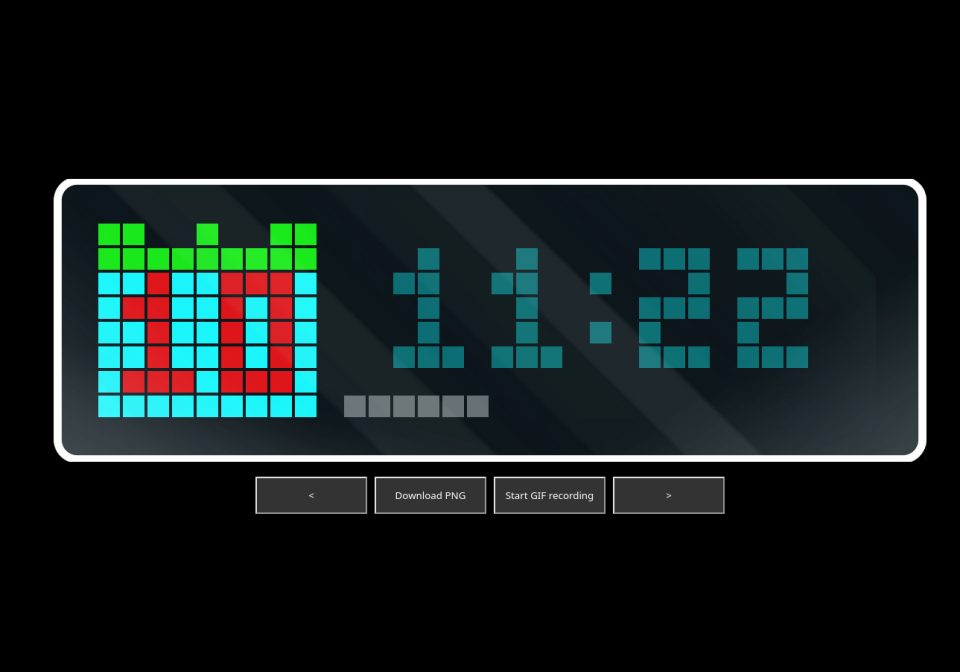
CalendarClockBar
Time app with calendar, time and progressbar (instead of "day of the week")
| System | Node-RED |
|---|---|
| Firmware | AWTRIX 3 |
| Topic | Miscellaneous |
| Built by | btro |
| File | PegM5VpJov3p.json · 2.2 KB |
| Icons | — |
| Published | 10 Mar 2025 · updated 10 Mar 2025 |
| Downloads | 20 |
This app displays a progress bar where the original "Time" app displays the day of the week. This progress bar displays the current second by default, but can also be filled with your own data. All colors and the start position of the progress bar etc. can be set via msg.*
You may set:
msg.startbar = column progressbar starts [default: 10]
msg.progress = 0 - 100 progressbar in % [default: second of minute]
msg.timestamp [default: "now"]
msg.colorsheet = color of calendar [default: "#0FFFFF"]
msg.colorhead = color of calendarhead [default: "#0FF000"]
msg.colordate = color of calendardate [default: "#F00000"]
msg.colortime = color of time [default: "#006666"]
msg.colorbar = color of progressbar [default: "#666666"]
msg.holes = 0 - 6 different sizes and positions of holes in sheet [default: 0]
PegM5VpJov3p.json
if ( !msg.timestamp ) msg.timestamp = Math.round(new Date());
var ts = new Date(msg.timestamp);
var uhr = {
	'month':	ts.getMonth() + 1,
	'day':		ts.getDate(),
	'year':		ts.getFullYear(),
	'hours':	ts.getHours(),
	'mins':		ts.getMinutes(),
	'secs':		ts.getSeconds(),
	'msecs':	ts.getMilliseconds()
}
if ( !msg.colorsheet ) msg.colorsheet = "#0FFFFF";
if ( !msg.colorhead ) msg.colorhead = "#0FF000";
if ( !msg.colordate ) msg.colordate = "#F00000";
if ( !msg.colortime ) msg.colortime = "#006666";
if ( !msg.colorbar ) msg.colorbar = "#666666";
if ( msg.startbar == null ) msg.startbar = 10;
if ( !msg.progress ) msg.progress = 100 * uhr.secs /60;

var pos
var hole1, hole2
msg.bar = msg.startbar + (msg.progress * (32 - msg.startbar)/100)

if ((msg.bar - msg.startbar)<1 ) {
    msg.startbar = -1
    msg.bar = -1
}
else {
    msg.bar = msg.bar-1
}

// Tage < 10 an anderer Position
if (uhr.day<10) {
    pos=3
    }
else{
    pos=1
    }

// Führende "0" bei Stunden <10
if (uhr.hours<10) {
    uhr.hours = "0" + uhr.hours
}
// Führende "0" bei Minuten <10
if (uhr.mins<10) {
    uhr.mins = "0" + uhr.mins
}
// Führende "0" bei Sekunden <10
if (uhr.secs<10) {
    uhr.secs = "0" + uhr.secs
}

switch(msg.holes) {
  case 1:
    hole1=[1,0,2,0,"#000000"]
    hole2=[6,0,7,0,"#000000"]
    break;
  case 2:
    hole1=[2,0,2,0,"#000000"]
    hole2=[6,0,6,0,"#000000"]
    break;
  case 3:
    hole1=[3,0,3,0,"#000000"]
    hole2=[5,0,5,0,"#000000"]
    break;
  case 4:
    hole1=[4,0,4,0,"#000000"]
    hole2=[-1,-1,-1,-1,"#000000"]
    break;
  case 5:
    hole1=[2,0,3,0,"#000000"]
    hole2=[5,0,6,0,"#000000"]
    break;
  case 6:
    hole1=[1,0,3,0,"#000000"]
    hole2=[5,0,7,0,"#000000"]
    break;
  default:
    hole1=[-1,-1,-1,-1,"#000000"]
    hole2=[-1,-1,-1,-1,"#000000"]
}

msg.payload =

{"draw":[
 {"df": [0,2,9,7, msg.colorsheet]},  // Kalenrderblatt
 {"df": [0,0,9,2, msg.colorhead]},
 {"dl": hole1},  // Löcher
 {"dl": hole2},

 {"dt": [pos, 2, uhr.day, msg.colordate]}, // Kalendertag
 {"dt": [12, 1, uhr.hours + ":" +  uhr.mins, msg.colortime]}, // Uhrzeit
 {"dl": [msg.startbar, 7, msg.bar, 7, msg.colorbar]}, // Bar

],
}

return msg;
More flows for Node-RED or Miscellaneous
Something wrong with this flow? Report it.