This flow was submitted before accounts existed, so nobody owns it yet. If you submitted it, open the edit link you were given — it still works — and you can attach the flow to an account from there. There is no deadline, and attaching it retires the link for good.
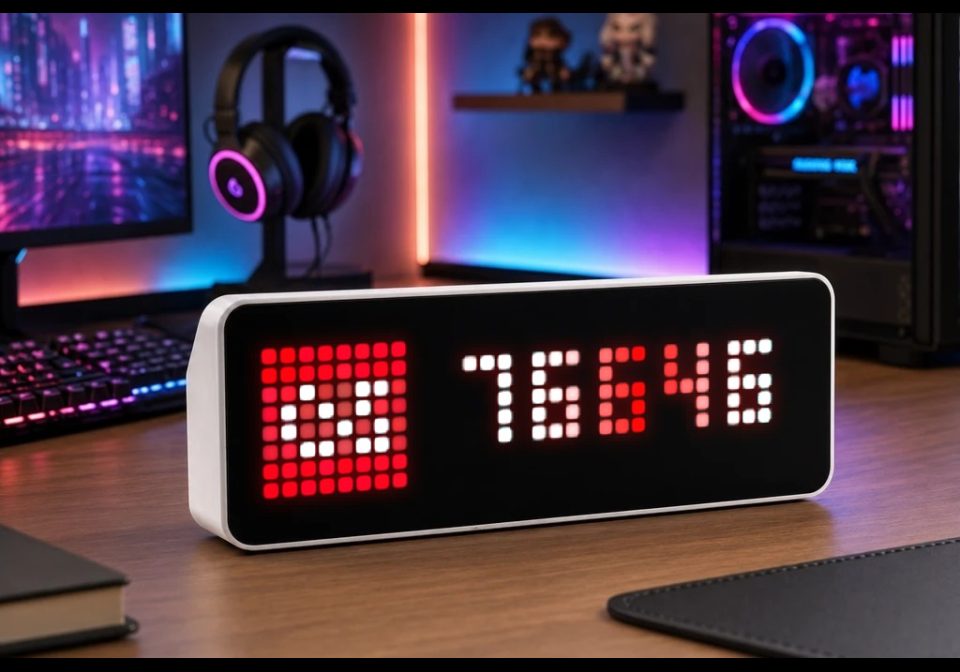
Last.fm Scrobble Counter
Last.fm Scrobble Counter for AWTRIX NG
| System | AWTRIX NG Scripts |
|---|---|
| Firmware | AWTRIX NG |
| Topic | Social |
| Built by | Hank_the_Tank |
| File | NMeKF8977O4F.ax · 2.8 KB |
| Icons | 1 |
| Published | 5 Aug 2026 |
| Downloads | 35 |
Last.fm Scrobble Counter for AWTRIX NG
Displays the total scrobble count of a Last.fm user on your AWTRIX NG.
Features
- Retrieves the total play count directly from Last.fm
- Configurable Last.fm username and API key
- Uses icon
11667 - Automatically shortens large numbers, for example
76.6K - Animated text
- Updates every 15 minutes
- Saves the latest value for immediate display after a restart
- Memory-efficient API request and response processing
Requirements
- AWTRIX NG with scripting support
- Last.fm API key
- Icon
11667installed on the device
Setup
- Install the script on your AWTRIX NG.
- Open its configuration from the Apps tab.
- Enter your Last.fm username and API key.
- Activate the app and add it to the rotation.
NMeKF8977O4F.ax
# @name    Last.fm
# @desc    Total scrobble count of a Last.fm profile
# @author  Hank_the_Tank / Codex
# @version 1.3
# @config  user    text "Profile name" default="YOUR_USERNAME" maxlen=32
# @config  api_key text "API key" default="YOUR_API_KEY" maxlen=64 help="Create one at last.fm/api/account/create"

class LastFM
  var url,user,key,period
  var count,label,full,err
  var ticks,busy

  def init()
    self.user=store.get("user")
    self.key=store.get("api_key")
    self.url="https://ws.audioscrobbler.com/2.0/?method=user.getinfo&user="+
             self.user+"&api_key="+self.key+"&format=json"
    self.period=900

    self.count=store.get("who")==self.user ? store.get("n") : nil
    self.label=self.count==nil ? nil : self.human(self.count)
    self.full=self.count==nil ? nil : str(self.count)
    self.err=self.key=="YOUR_API_KEY" || self.key==""
    self.ticks=self.err ? self.period : 15
    self.busy=false
  end

  def human(n)
    if n<1000 return str(n) end
    var d=1000
    var suf="K"
    if n>=1000000000
      d=1000000000
      suf="B"
    elif n>=1000000
      d=1000000
      suf="M"
    end
    var v=n/(d+0.0)
    if v>=10 return str(round(v))+suf end
    var t=round(v*10)
    return str(int(t/10))+"."+str(t%10)+suf
  end

  def on_body(body,status)
    self.busy=false
    shared.set("f",0)
    if status!=200 || body==nil
      self.err=true
      return
    end
    var m=re.search("(\\d+)",body)
    if m==nil
      self.err=true
      return
    end
    var n=num(m[1])
    if n==nil return end
    self.err=false
    if n==self.count return end
    self.count=n
    self.full=str(n)
    self.label=self.human(n)
    store.set("n",n)
    store.set("who",self.user)
  end

  def tls_busy()
    for k : shared.keys()
      if size(k)>2 && k[size(k)-2..size(k)-1]==".f" && shared.get(k)==1
        var a=shared.age(k)
        if a!=nil && a<20000 return true end
      end
    end
    return false
  end

  def loop()
    if self.ticks<=0
      if !self.busy && !self.tls_busy()
        self.ticks=self.period
        self.busy=true
        shared.set("f",1)
        http.get(self.url,/ b,st -> self.on_body(b,st),
                 {'find':"\"playcount\":",'keep':32})
      end
    end
    self.ticks-=1
  end

  def draw()
    clear()
    if !icon("11667",0,0)
      text(1,6,"L",0xD51007)
    end

    if self.label!=nil
      var avail=width()-9
      var s=self.full
      var w=text_ink_width(s)
      if w>avail
        s=self.label
        w=text_ink_width(s)
      end
      ramp_text(9+(avail-w)/2,6,s,"lastfm")
      return
    end

    var s=self.err ? "?" : "..."
    var w=text_ink_width(s)
    text(9+(width()-9-w)/2,6,s,self.err ? 0xCC7722 : 0x555555)
  end
end

return LastFM()
Install it on your AWTRIX NG
Your browser writes the script straight to the device on your network. It joins the app rotation right away.
Some browsers refuse to talk to a device on your network from a public page. Download the flow and paste it into the Scripts tab of your device, or install it from a terminal:
These icons belong on the device, in /ICONS. Each one is at
most 32×8
pixels — shown here magnified, at their real proportions.

8×8 px
More flows for AWTRIX NG Scripts or Social
Something wrong with this flow? Report it.