This flow was submitted before accounts existed, so nobody owns it yet. If you submitted it, open the edit link you were given — it still works — and you can attach the flow to an account from there. There is no deadline, and attaching it retires the link for good.
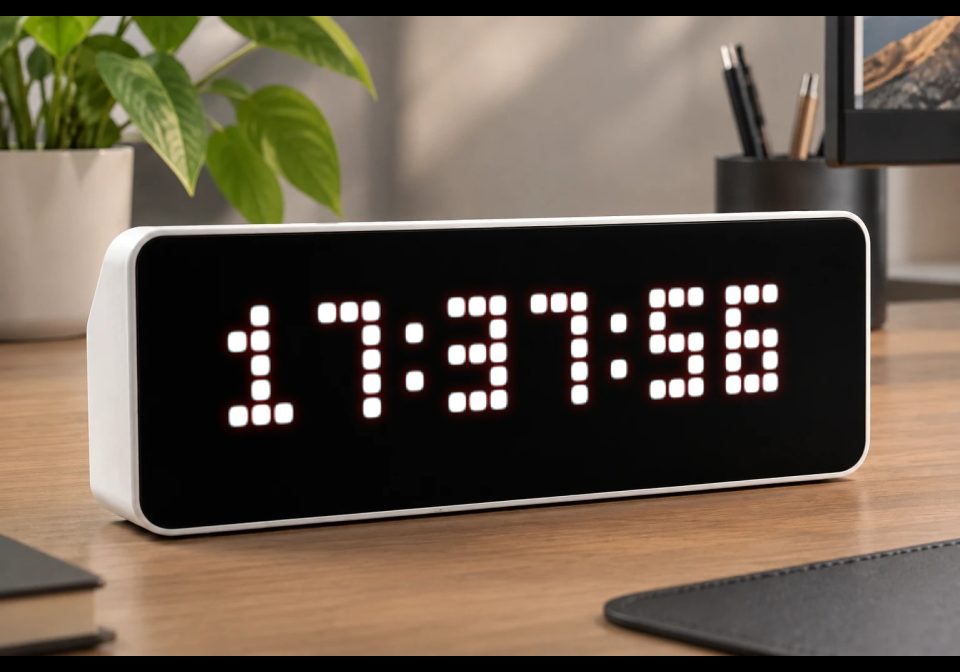
Clock_S - Customizable Pixel Clock
Small centered clock HH:MM or HH:MM:SS with customizable color and blinking colon
| System | AWTRIX NG Scripts |
|---|---|
| Firmware | AWTRIX NG |
| Topic | Miscellaneous |
| Built by | Avemer |
| File | FeQ2kYpQoh5l.ax · 1.8 KB |
| Icons | — |
| Published | 9 Aug 2026 · updated 10 Aug 2026 |
| Downloads | 6 |
Update 1.1 The settings menu has been moved up in the code.
FEATURES
- Medium 3×5 pixel digits
- 24 HH time format
- Centered on the 32×8 AWTRIX display
- Customizable clock color
- The ability to turn on and off the seconds display
- Optional blinking colon
- Colon blinks once per second when enabled
- Designed specifically for AWTRIX 3 Berry scripting
SETTINGS
In code look for section ====== START OF USER SETTINGS ======
1. BLINK_COLON
Controls whether the : blinks.
self.BLINK_COLON = 1
1 = colon blinks once per second
0 = colon stays permanently visible
2. CLOCK_COLOR
Controls the color of the clock.
The color is specified as a hexadecimal RGB value:
self.CLOCK_COLOR = 0xFFFFFF
Examples:
0xFFFFFF # White
0xFF0000 # Red
0x00FF00 # Green
0x0000FF # Blue
0xFFFF00 # Yellow
0x00FFFF # Cyan
0xFF00FF # Magenta
3. SHOW_SECONDS = 0
1 = show seconds
0 = hide seconds
You only need to change these settings; the rest of the script can remain unchanged.
Display
The clock displays the current time using large custom pixel digits:
HH:MM:SS
The script uses the AWTRIX draw() loop, so the display updates automatically.
GENERAL
The code contains explanations if you want to change something, such as the text position.
Vibecoded with ChatGPT, polished by Avemer.
And I'm a newbie, hope someone might find this script usefull!
FeQ2kYpQoh5l.ax
# @name Clock_S
# @desc Small centered clock HH:MM or HH:MM:SS with customizable color and blinking colon
# @author Avemer
# @version 1.1
class Clock

# USER VARIABLES
var CLOCK_COLOR
var BLINK_COLON
var SHOW_SECONDS

# ================ START OF USER SETTINGS ================
def init()
# CLOCK COLOR
# Format: 0xRRGGBB
# Examples:
# 0xFFFFFF White
# 0xFF0000 Red
# 0x00FF00 Green
# 0x0000FF Blue
# 0xFFFF00 Yellow
# 0x00FFFF Cyan
# 0xFF00FF Magenta
self.CLOCK_COLOR = 0xFFFFFF

# BLINK COLON
# 1 = blinking
# 0 = always visible
self.BLINK_COLON = 1

# SHOW SECONDS
# 1 = show seconds
# 0 = hide seconds
self.SHOW_SECONDS = 0
# ================ END OF USER SETTINGS ================

end

# MAIN LOOP
# AWTRIX automatically calls draw().
def loop()
end

# DRAW CLOCK
def draw()

clear()

# GET CURRENT TIME
var h = hour()
var m = minute()

# Seconds are only used when SHOW_SECONDS = 1.
var ss = second()

# CONVERT NUMBERS TO TEXT
var hh = str(h)
var mm = str(m)
var sec = str(ss)

# ADD LEADING ZERO TO HOURS
if h < 10
hh = "0" + hh
end

# ADD LEADING ZERO TO MINUTES
if m < 10
mm = "0" + mm
end

# ADD LEADING ZERO TO SECONDS
if ss < 10
sec = "0" + sec
end

# CREATE TIME STRING
var value = hh + ":" + mm

# ADD SECONDS IF ENABLED
if self.SHOW_SECONDS == 1

value = value + ":" + sec

end

# BLINK COLON
# If blinking is enabled, hide the colons
# during odd-numbered seconds.
if self.BLINK_COLON == 1

if ss % 2 == 1

value = hh + " " + mm

if self.SHOW_SECONDS == 1

value = value + " " + sec

end

end

end

# CENTER TEXT HORIZONTALLY
var w = text_ink_width(value)
var x = int((width() - w) / 2)

# DRAW TEXT
text(
x,
6,
value,
self.CLOCK_COLOR
)

end

# BUTTON
def on_button(btn)
end

end

return Clock()
Install it on your AWTRIX NG
Your browser writes the script straight to the device on your network. It joins the app rotation right away.
Some browsers refuse to talk to a device on your network from a public page. Download the flow and paste it into the Scripts tab of your device, or install it from a terminal:
More flows for AWTRIX NG Scripts or Miscellaneous
Something wrong with this flow? Report it.